Tuesday, March 24, 2009

Technology Enhanced Lesson Used

I think it would be a great way to incorporate technology into a lesson that I already have planned. I have planned a guided reading lesson to do on Friday morning. This guided reading lesson is with a small group of students, around 5, and they will be introduced to a new book. I will make a powerpoint presentation to introduce the students to the new book. This could be a great visual way for students to be prepared for what they will be reading about. I will include slides that show new vocabulary that they will be exposed to as well as information about the author. Students may find it interesting to learn about the people who write the books they read. I think that by displaying this Powerpoint presentation on a laptop to the class would be a great way for students to access the information. When a small group of students is being taught, using one laptop should be sufficient for them to be able to see the information. I think that incorporating technology into lessons already planned and thought of is a much better way to use technology rather than base the lesson around the technology. Since I had planned on introducing a new book to a reading group, I figured that I could enhance the lesson by using technology, specifically Powerpoint.

Tuesday, March 17, 2009

Technology Enhanced Lesson

An idea to technologically enhance a lesson on simple machines--identification and their specific uses--would be to first introduce the concept of simple machines. Go over them so students are aware of the various types of machines. Then a way to check for understanding would be to go to an incredible website that can be displayed on the projector that is in my 3rd grade class. The website lets you go to a room, such as a kitchen, and then you can highlight various items in the room. Students can then be quizzed on what type of simple machine was used. This activity seems like it would be fun and engaging for the students. They can all interact with the website by suggesting what object in the room to highlight next. This technology is readily available for use in the classroom. The website is found at edheads.org. Once there, the simple machines activity can be found. The website is http://www.edheads.org

Tuesday, March 10, 2009

Classroom Inventory Technology

While doing the inventory of classroom technology I was rather surprised that the classroom did not have a permanent computer in it. The teacher brings her laptop everyday that students can access to, but I think it was unfortunate that there was not a classroom computer. I was glad to see that there was access to wireless internet though. I also thought it was interesting that every computer in the lab was a Mac computer. Mac computers are great, but I think it would be better to incorporate PC's as well so students are aware of them and their differences. In every 5th grade class at Deerfield, there is a classroom set of labtops and also a smartboard. I would love to see more technology in lower grades so that students are immersed in technology early on. I love the interactive intercom that the school uses. The office can contact the teacher through this intercom and the teacher can simply talk back and communicate. I was impressed with the school's technology and the resources available, but disappointed with each classrooms permanent technology.

Wednesday, February 25, 2009

Quiz Questions for Modules 27-30

1. When students are given tasks that have connections and implementations to problems that they may face in the real world, they have been given authentic tasks.
2. Problem-based learning often deals with problems that do not have clear cut "right" answers.
3. A student exhibiting learned helplessness shows that they cannot complete their work without lots of extra help from a teacher.
4. Achievement in school can be promoted by goal orientations.
5. Incentives are objects or events that encourage behaviors, but also can be used to discourage behaviors.

1. T
2. T
3. F
4. T
5. T

Over the River Again

TPACK Questions for Virtual Tour

What is the content you’ll be using in your lesson?

The content that I will be using for my lesson is found in the Utah state core curriculum for 4th grade. It is under Standard 3, Objective 1, c which states "Sort rocks by appearance according to the three basic types: sedimentary, igneous and metamorphic (e.g., sedimentary–rounded-appearing mineral and rock particles that are cemented together, often in layers; igneous–with or without observable crystals that are not in layers or with or without air holes or glasslike; metamorphic –crystals/minerals, often in layers)." I remember having to memorize rocks for a class I recently took and was disappointed that my teacher could not come up with an interesting and fun way to have us learn and remember these rock names. I feel like this activity with GoogleEarth will help students become excited about learning about rocks.

What is the pedagogy you’ll be using and why is it a good fit with the content?

I am using good pedagogy by selecting content that is normally hard to understand and unclear of the importance of it. My students will be using classification, researching, comparing as well as contrasting the three different types of rocks. I feel like since the students have first been given an overview of the different rocks they will benefit more from exploring the rocks and where they are formed themselves.

What is the technology you’ll be using and why is it a good fit with the content and pedagogy?

The technology I will be using for this lesson is Google Earth as well as images from online sources and information accessible from Wikipedia. I feel like GoogleEarth is a good fit for the content because it enables students to see real life examples of rocks and how rocks are formed and where they are formed. The students can see the rocks in different areas and compare and contrast the characteristics of the rocks as well as the areas that they are looking at. No other tool that I know of allows people to view real life areas on a zoomed in scale at street view. Students can see so much of what they are learning now, instead of having to rely on maps and pictures. They can go there through GoogleEarth and see the areas. GoogleEarth is an exciting tool that students will love.

Virtual Tour Plan

Location ActivityGoogle Earth Content
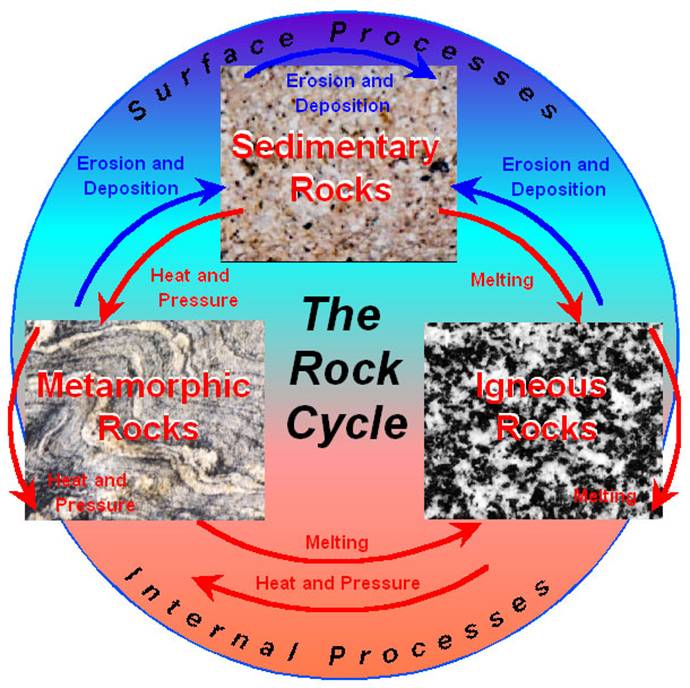
1.West Indies (igneous)Briefly introduce the rock cycle and explain that they will see places where all 3 parts occur. Have students reach the location on GoogleEarth. Ask the students what type of rock is formed at the volcano they see at Mount Rausu; discuss what happens in forming igneous rocks. Then have them watch the igneous rock video at
http://activities.macmillanmh.com/science/c
a/scienceinmotion/Common/SIM.html?Module=../Grade4/Chapter3-IgneousRockFormation/Then have the students look at pictures of various igneous rocks.

Panoramio

Terrain Feature

Lables

Pathway

2.Grand Canyon, Arizona (sedimentary)Have students reach the location on GoogleEarth. Teacher will explain process of forming sedimentary rocks. Have them watch the sedimentary rock video at
http://activities.macmillanmh.com/science/c
a/scienceinmotion/Common/SIM.html?Module=../Grade4/Chapter3-IgneousRockFormation/
Have students look at pictures of various sedimentary rocks
Panoramio
Terrain Feature
Lables
Pathway
3.Maunola, Hawaii (metamorphic)Have students reach the location on GoogleEarth. Teacher will explain process of forming metamorphic rocks. Have them watch the metamorphic rock video at
http://activities.macmillanmh.com/science/c
a/scienceinmotion/Common/SIM.html?Module=../Grade4/Chapter3-IgneousRockFormation/Have students look at pictures of various metamorphic rock
Panoramio
Terrain Feature
Lables
Pathway
4.Karnataka, India (sedimentary)Have students reach the location on GoogleEarth. Have students explore this area using the zoom features and others available to identify at least one type of rock in the area. Once students identified one rock formation have students explore other locations and the rocks there.Panoramio
Terrain Feature
Lables
Pathway
Details of image overlay / path / polygon:In our Google tour we used the Geographic web features of Panoramio. We also used the terrain feature, and labels so the students would know what they were actually looking at. Our tour began at Mount Rausu, Japan, it then went to the Grand Canyon, Arizona, next it went to Manualoa, Hawaii, and finally to Karnataka, India. The path shows the travel route to each location.
SOURCES:
Igneous Rock Formation:http://www.outreach.canterbury.ac.nz/resources/geology/glossary/igneous.jpg
Three Types of Rock Formation:http://i.ehow.com/images/GlobalPhoto/Articles/2281951/RockCycle-main_Full.jpg
The Rock Cycle:http://web.ics.purdue.edu/~braile/edumod/pebble/pebbleAM_files/image007.jpg
Sedimentary Rock Formation:http://www.energyinst.org.uk/education/glossary/images/sediment.gif
Metamorphic Rock Formation:http://www.bbc.co.uk/schools/ks3bitesize/science/images/sci_dia_33.gif
Metamorphic Rocks:http://honolulu.hawaii.edu/distance/geolab/R*M/metrx.jpg
Igneous Rocks:http://honolulu.hawaii.edu/distance/geolab/R*M/metrx.jpg
Sedimentary Rocks:http://honolulu.hawaii.edu/distance/geolab/R*M/sedrx.jpg